Quickstart
Let’s introduce Hesiod with an example.
Config files
Imagine that you write some python program where you need a dataset, a neural network and other parameters. Don’t worry if you’re not familiar with these terms, their just entities used in your program and you can adapt this example to many different scenarios. For the sake of our example, let’s say that each run of your program will use a different dataset or a different network or different parameters. To achieve this, you can write a config file for each element and organize them in a hierarchy of directories, something like this:
cfg/bases
|____ dataset
|    |
|    |____ cifar.yaml
|    |____ imagenet.yaml
|
|____ net
|    |
|    |____ resnet101.yaml
|    |____ efficientnet.yaml
|
|____ params
     |
     |____ training.yaml
     |____ test.yaml
Each .yaml file contains the specific config for that element, for instance:
# cfg/bases/dataset/cifar.yaml
name: "cifar10"
path: "/path/to/cifar10"
splits: [70, 20, 10]

# cfg/bases/dataset/imagenet.yaml
name: "imagenet"
path: "/path/to/imagenet"
splits: [80, 10, 10]

# cfg/bases/net/resnet101.yaml
name: "resnet101"
num_layers: 101
ckpt_path: "/path/to/resnet101"

# cfg/bases/net/efficientnet.yaml
name: "efficientnet"
num_layers: 20
ckpt_path: "/path/to/efficientnet"

# cfg/bases/params/training.yaml
optimizer: "SGD"
lr: 1e-4

# cfg/bases/params/test.yaml
metric: "accuracy"
times: 10
Run files
A first option, now, is to create a run file where you combine the configs according to what you intend to do in a specific run. For instance, you could do something like:
# cfg/run.yaml

dataset:
    base: "dataset.cifar"
    splits: [60, 30, 10]
net:
    base: "net.efficientnet"
params:
    base: "params.training"
    lr: 1e-3
others:
    log_dir: "/path/to/logs"

run_name: "train_efficientnet_on_cifar"
As you may see, Hesiod allows you to combine config files with the base mechanism. Of course, you are not limited to that and you can both:
override base configs values
add new configs.
Hesiod hmain decorator
You’re almost good to go. You just need to wrap your code with Hesiod decorator hmain,
setting the path to the dir with the base configs and the path to the run file that you created
for the run. Your main file could be something like:
# main.py

from hesiod import hmain

@hmain(base_cfg_dir="./cfg/bases", run_cfg_file="./cfg/run.yaml")
def main():
    # do some fancy stuff
    ...

if __name__ == "__main__":
    main()
When you run main.py, Hesiod will read run.yaml and load all your configs by resolving
all the bases. Then, it will create an output directory for the current run, named as you
specified in the field run_name in run.yaml. Finally, Hesiod will save in the newly
created output directory a single .yaml file with the completely specified version of the
config of the run (i.e. with all the bases resolved). After all that, Hesiod will run your main
function leaving it completely unchanged.
If for any reason you don’t want to load any specific config, you can omit the run_cfg_file
argument, like this:
# main.py

from hesiod import hmain

@hmain(base_cfg_dir="./cfg/bases")
def main():
    # do some fancy stuff
    ...

if __name__ == "__main__":
    main()
In this case, Hesiod will simply prepare an empty config for the current run.
Get the config values in the program
There are two options to access config values in a program wrapped in Hesiod.
The function get_cfg_copy
Anywhere in the code, you can use the function hesiod.get_cfg_copy() to get a copy of the
whole config. The config is a returned as a single dictionary with string keys.
In the example above, for instance, you can do the following:
from hesiod import get_cfg_copy

cfg = get_cfg_copy()
dataset_name = cfg["dataset"]["name"]  # -> cifar10
The function hcfg
Alternativerly, Hesiod offers an even more direct approach to get a config value.
Anywhere in the code, you can use the function hesiod.hcfg(key, type=None) to get the
value of one specific config. The key argument can be a composition of keys and subkeys,
separated by dots (e.g. “key.subkey1.subkey2”). The type argument is optional, but it provides two
advantages: it enables Hesiod to perform some type checking and it makes the linter life easier,
by casting the returned value to the proper type. You can use the hcfg() function like this:
from hesiod import hcfg

dataset_name = hcfg("dataset.name", str)  # -> cifar10
Set the config values programmatically
Hesiod allows you to set config values programmatically with the function hesiod.set_cfg(key, value).
The given key can be a single config key or a composition of subkeys separated by dots, as in
key.subkey.subsubkey.subsubsubkey.... Hesiod will update properly the current config in order to
create new configs or to change existing ones.
Template files
So far, we have seen that it is possible to define a run file for each run of your program. This allows to separate your configs from your code, but it’s not very flexible and, most importantly, it requires you to prepare run files manually for every run, which is tedious and error prone. To overcome these limitations, Hesiod introduces the concept of template config files, where you define a generic structure for your config, without specifying the actual values that will be used in every run. A valid template file for our example could be:
# cfg/template.yaml

dataset: "@BASE(dataset)"  # every run will need a dataset...
net: "@BASE(net)"          # ...and a network...
params: "@BASE(params)"    # ...and some params
p1: 1
p2: 2.3
p3: "test"
As you may see, in the template file you can use special placeholders to define,
for instance, that a specific config (e.g. dataset) will be selected among the bases contained
in the base directory dataset. By doing that, you can define the generic structure of the configs
needed in your program, postponing the selection of specific values to the moment in which the
program will be executed.
To use a template config file, instead of a run file, you need to make a small change
to the args passed to hmain:
# main.py

from hesiod import hmain

@hmain(base_cfg_dir="./cfg/bases", template_cfg_file="./cfg/template.yaml")
def main():
    # do some fancy stuff
    ...

if __name__ == "__main__":
    main()
At this point, you may say “this sounds interesting, but how do I specify the actual values for a run of my program when using template files?”. Well, bear with me and keep reading.
TUI (Text-based User Interface)
When you run main.py, you will be presented with a Text-based User Interface (TUI), where
you will be able to fill with actual values the config specified in the template file:
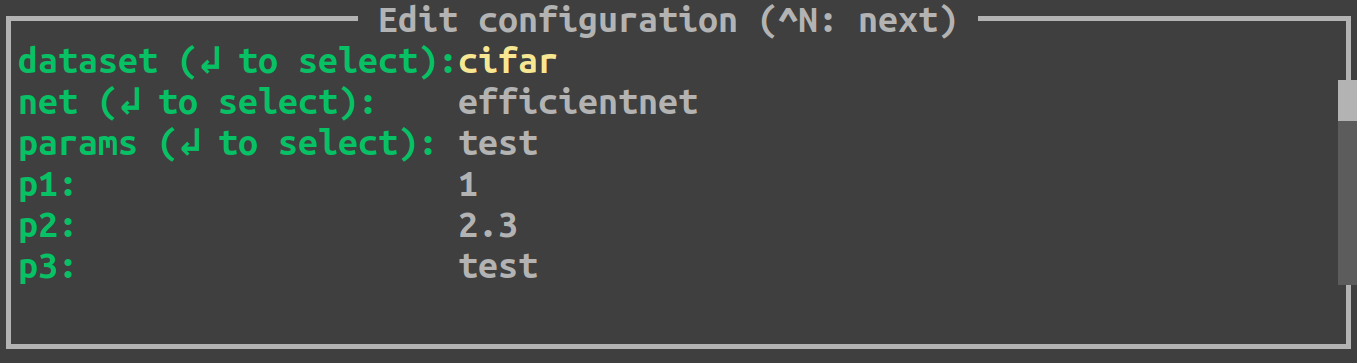
Depending on how you specified configs in the template file, you can fill values with different
modalities. If you used the @BASE decorator (like we did for dataset, net and params), Hesiod
will load all the possibilities for each base. For example, if you press ENTER on the field
net you will be able to select among efficientnet and resnet101:

When you are done editing and selecting values for all your configs, you can press CTRL+N and
Hesiod will show you a recap of the whole config.

If you spot something wrong, you can go back and edit the configs by pressing CTRL+B.
Otherwise, you can insert a name for this specific run and press CTRL+N to close the TUI.
Hesiod will conclude its execution, as always, by creating an output directory for the current run,
named as you requested, and by saving in this directory a single .yaml file with the completely
specified version of the config of the run. The control goes now back to your program, where you
will be able to access configs in the exact same way as stated above.